Running an Authoritative DNS Server
I have been running my own Domain Name Server for several years. Some people argue the merits of doing such a thing when you can just put it in the “cloud”, but I enjoy managing DNS with all the flexibility and enrichment it brings.

I run Bind version 9 in a FreeBSD Jail and it serves as the authoritative nameserver for about six different domains. I use Hurricane Electric and BuddyNS as secondaries.
Naturally, I have DNS logging turned on:
logging {
  channel my_syslog {
  syslog daemon;
  severity info;
};
channel my_file {
  file "/usr/local/etc/namedb/log/named.log" versions 200 size 20m;
  severity dynamic;
  print-time yes;
  print-category yes;
  print-severity yes;
};
category default { default_syslog; my_file; };
category queries { my_file; };
I definitely recommend turning on query logging. It will generate a lot of logs, however the data will be invaluable especially if you decide to use Elasticsearch, ELSA, ArcSight or splunk to ingest and analyse your DNS data.
Here is a glimpse of a splunk dashboard I created for bind query logs:
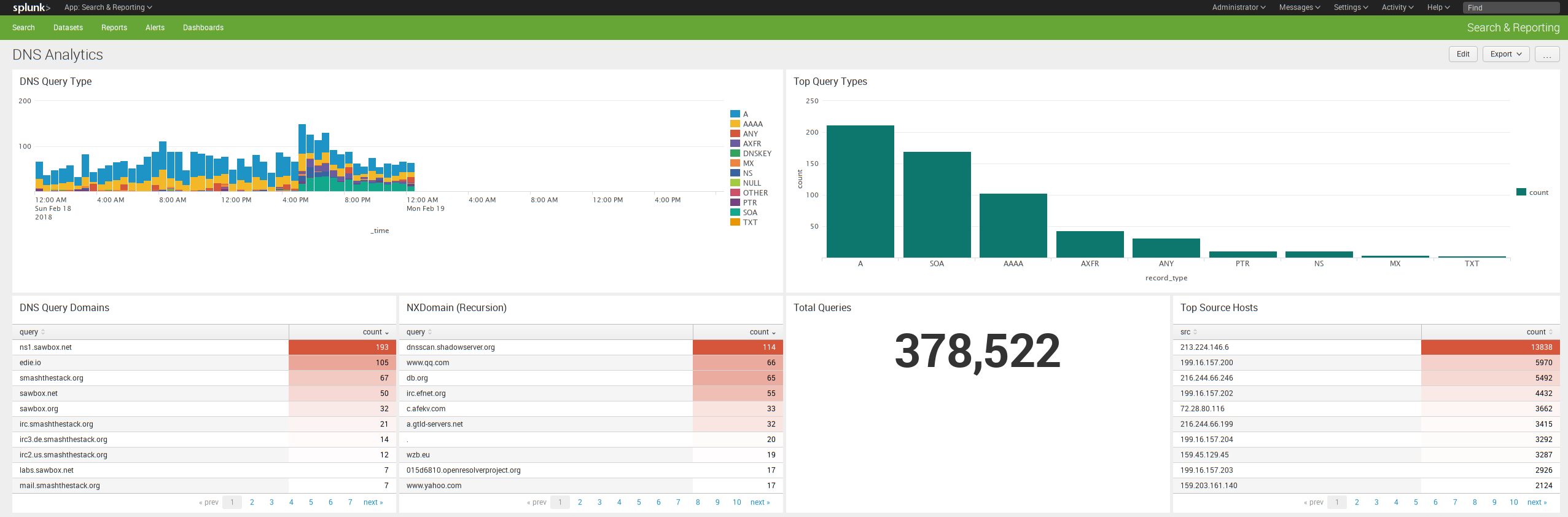
Over the years I have noticed numerous attempts to assess my DNS posture. For instance, just take a look at some of my log excerpts below:
Version Scanning:
45.20.17.160#10088 (version.bind): query: version.bind CH
80.82.77.33#15780 (VERSION.BIND): query: VERSION.BIND CH
192.241.168.215#48427 (version.bind): query: version.bind CH
196.52.43.88#6712 (VERSION.BIND): query: VERSION.BIND CH
188.166.34.51#56790 (version.bind): query: version.bind CH
45.56.78.169#45669 (version.bind): query: version.bind CH
172.104.20.44#43131 (version.bind): query: version.bind CHEnumeration:
query: beaufort.smashthestack.org IN ANY -E (72.20.33.89)
query: harvard.smashthestack.org IN ANY -E (72.20.33.89)
query: welland.smashthestack.org IN ANY -E (72.20.33.89)
query: troscom.smashthestack.org IN ANY -E (72.20.33.89)
query: eichstaett.smashthestack.org IN ANY -E (72.20.33.89)
query: gilbert.smashthestack.org IN ANY -E (72.20.33.89)
query: stealth.smashthestack.org IN ANY -E (72.20.33.89)
Zone Transfers:
120.192.250.30#47392 zone transfer 'smashthestack.org/AXFR/IN' denied
13.113.28.177#40016 zone transfer 'smashthestack.org/AXFR/IN' denied
141.212.122.144#35358 zone transfer 'smashthestack.org/AXFR/IN' denied
141.212.122.96#35524 zone transfer 'smashthestack.org/AXFR/IN' denied
145.220.24.151#36824 zone transfer 'sawbox.org/AXFR/IN' denied
145.220.24.151#42180 zone transfer 'smashthestack.org/AXFR/IN' denied
52.68.42.211#47925 zone transfer 'sawbox.net/AXFR/IN' denied
Recursion Requests:
198.20.70.114#43780 query (cache) 'direct.shodan.io/A/IN' denied
95.215.62.189#41156 (.): query (cache) './ANY/IN' denied
191.96.249.61#32333 (d5l.ru): query (cache) 'd5l.ru/ANY/IN' denied
191.96.249.61#32333 (pay.gov): query (cache) 'pay.gov/ANY/IN' denied
52.91.131.184#3197 query (cache) 'www.yahoo.com/A/IN' denied
If you are like me you then you are all about the quick wins, data analytics, and data visualization. Here is a quick and dirty command line quick win to grab the top queries from your DNS logs:
root@dns1(log):# grep -i query named.log* > dns_queries
root@dns1(log):# cat dns_queries | cut -d" " -f11 | sort | uniq -c | sort -nr
244970 A
101516 AAAA
10153 ANY
9030 PTR
3694 MX
3178 NS
2325 SOA
1940 TXT
 728 denied
 292 SRV
 263 CAA
 256 CNAME
 204 DNSKEY
 142 AXFR
 113 SPF
  66 A6
  59 RRSIG
  56 TLSA
  50 NAPTR
  47 LOC
   6 EID
   5 DS
   2 HINFO
So you see, there is plenty to keep you busy. I am still enjoying the ride. Thanks for reading.